Cloud Disaster Recovery: How It Works
Cloud disaster recovery (cloud DR) keeps copies of your systems and data replicated in the cloud so that, after an outage, attack, or disaster, you can fail over and keep running. It works through continuous replication, defined recovery targets (RTO and RPO), and tested failover.
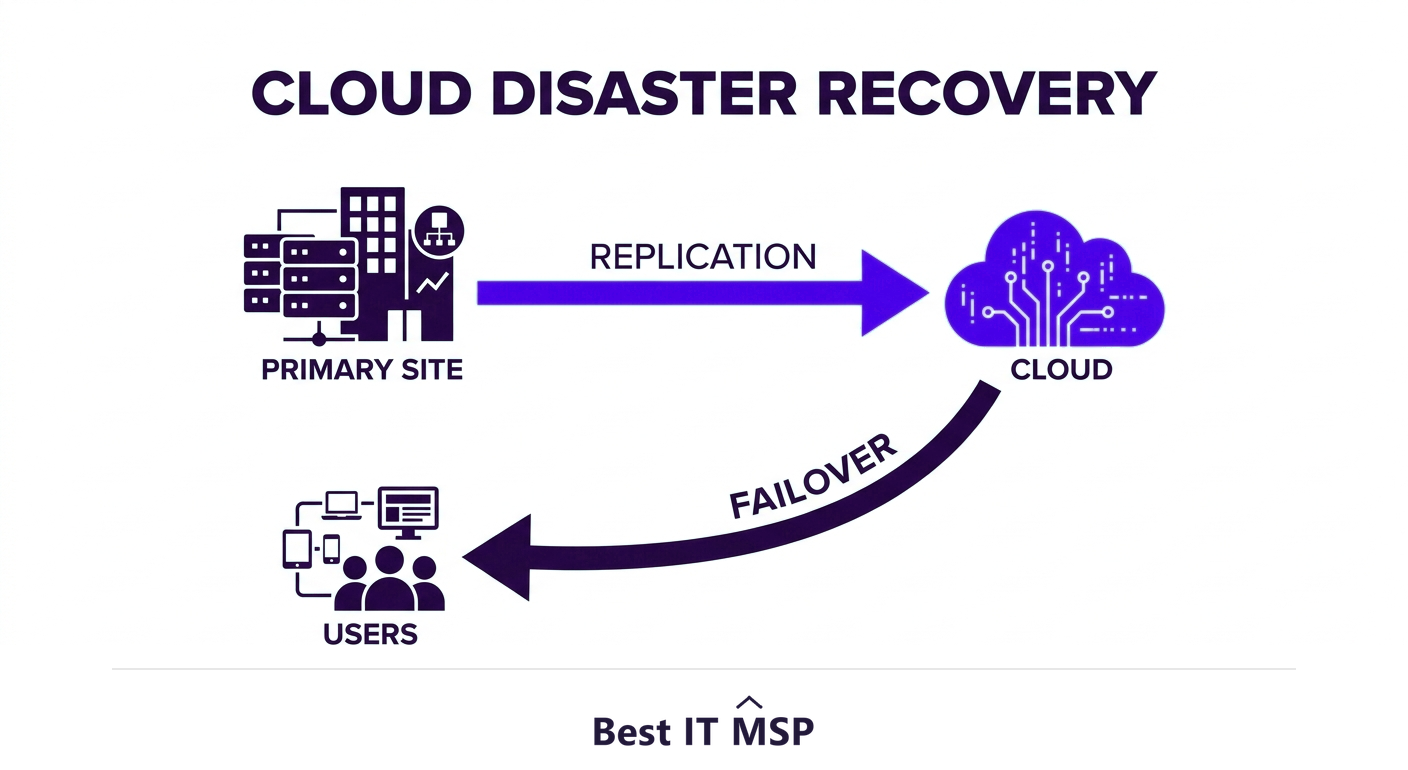
- Cloud disaster recovery replicates your systems and data to the cloud so you can fail over after a disaster.
- Two targets define a good plan: RTO (how fast you must recover) and RPO (how much data you can afford to lose).
- It is faster, cheaper, and easier to test than traditional secondary-site disaster recovery.
- Disaster Recovery as a Service (DRaaS) delivers cloud DR as a fully managed subscription.
- A plan you have never tested is not a plan; regular failover testing is what makes recovery real.
What is cloud disaster recovery?
Cloud disaster recovery, often shortened to cloud DR, is the practice of keeping copies of your critical systems and data replicated in the cloud so that, when something goes wrong, you can quickly switch over and keep the business running. The disaster might be a server failure, a ransomware attack, a flood or fire at your office, or a simple human error that wipes out important data. Whatever the cause, the goal is the same: get back to working as fast as possible with as little lost data as possible. Cloud DR makes that achievable for businesses of every size, not just large enterprises with deep budgets.
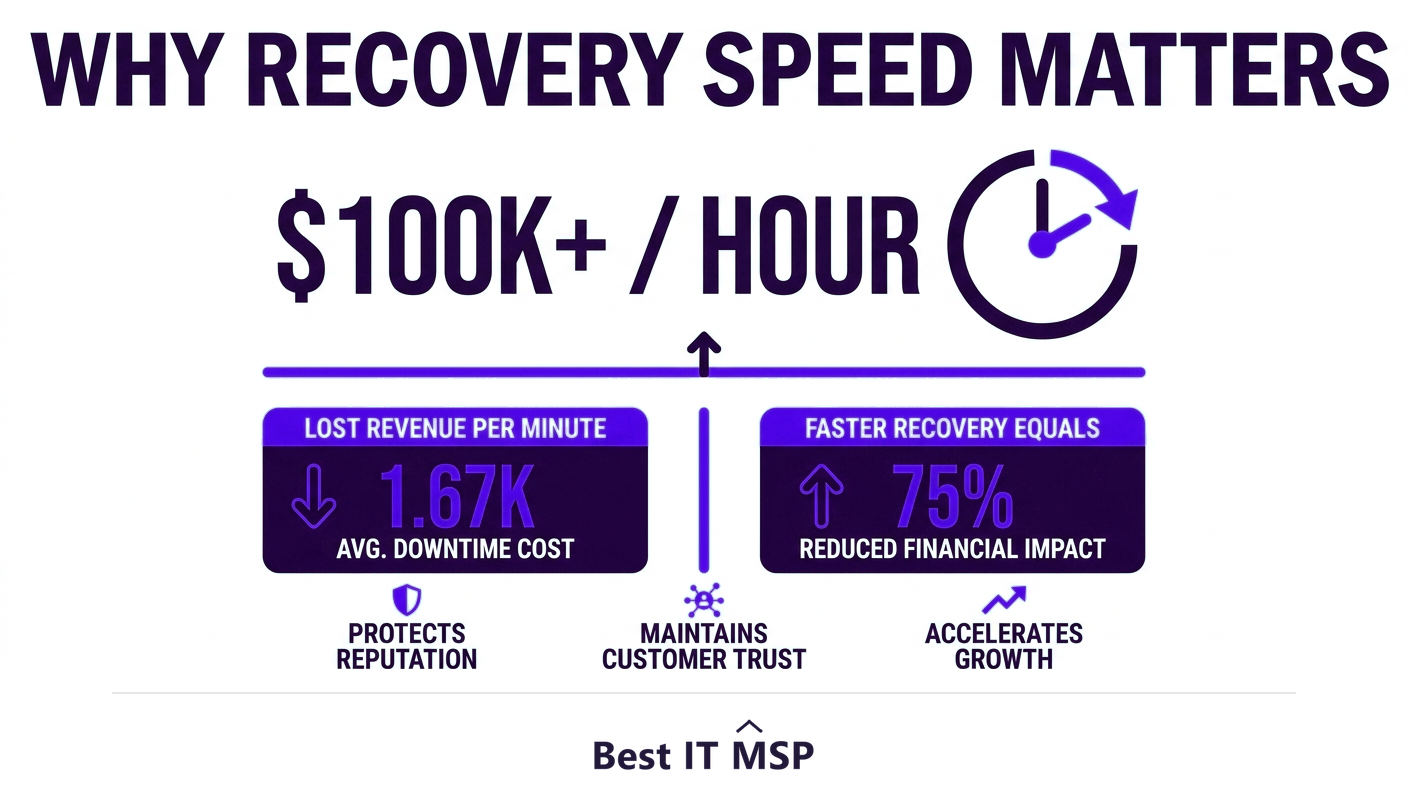
This matters because downtime and data loss are expensive and increasingly common. An hour of downtime costs most organizations more than $100,000, the average data breach reaches $4.88 million and takes about 258 days to identify and contain, and reported cybercrime losses topped $12.5 billion in a single year, with ransomware a leading cause of business-stopping outages. A disaster recovery plan is what stands between a bad day and a closed business. This guide explains how cloud DR works and how to build a plan that actually restores your operations. It pairs with our backup and disaster recovery services overview.
How cloud disaster recovery works
At its core, cloud DR works by continuously copying your systems and data to a cloud environment that sits ready to take over. Rather than backing up to a tape or a drive that someone has to physically restore, your servers, applications, and data are replicated to the cloud on an ongoing basis, so the cloud copy is always close to current. When a disaster strikes your primary environment, you fail over: the cloud versions of your systems spin up and your users connect to them instead, often within minutes. Once the primary site is repaired, you fail back, syncing any changes and returning to normal operations.
Because the cloud provides computing power on demand, you do not have to pay to run a full duplicate of your infrastructure around the clock. The standby resources can stay small or dormant and scale up only when you actually need to recover, which is the key economic advantage over traditional disaster recovery. This scalable, on-demand model is also what makes cloud DR a natural part of a wider business continuity plan, the broader strategy for keeping the whole business running through any disruption. The whole process is software-driven, which also means it can be tested, automated, and documented in ways that physical recovery never could be.
RTO and RPO: the two numbers that define your plan
Every disaster recovery plan is shaped by two targets, and understanding them is essential to getting DR right:
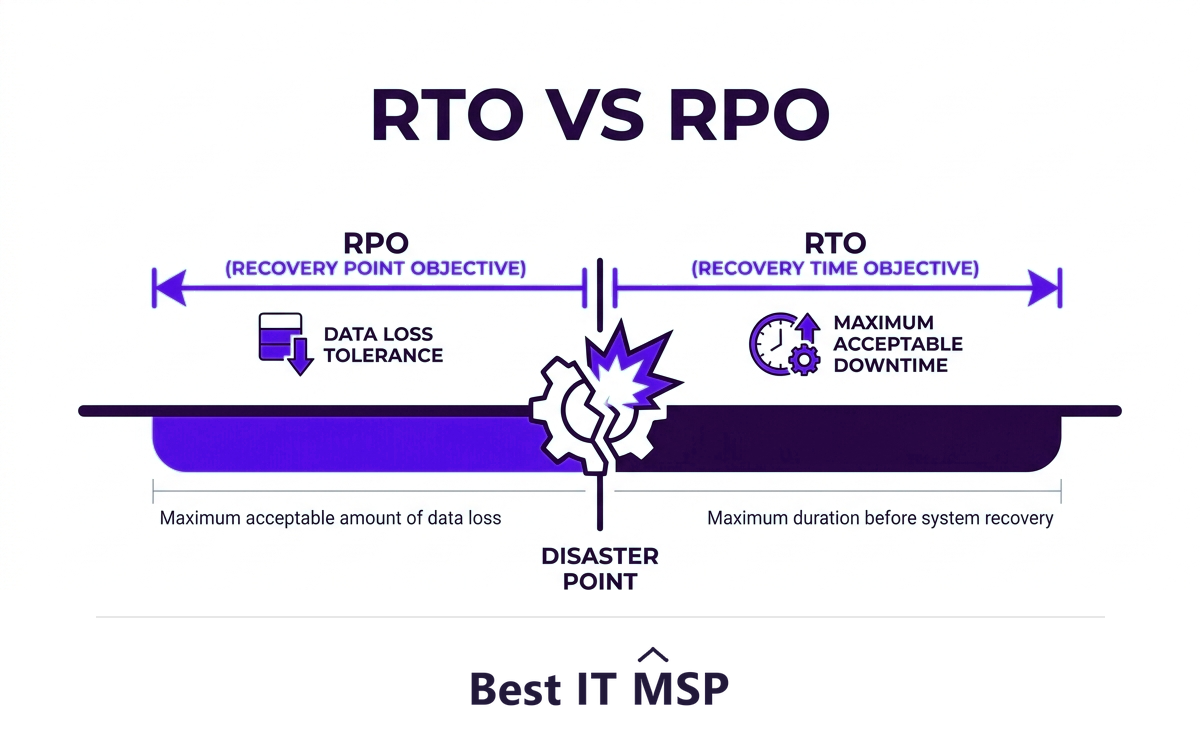
- <strong>RTO (Recovery Time Objective)</strong> is how quickly you must be back up and running after a disaster. An RTO of one hour means systems must be restored within an hour; a longer RTO is cheaper but means more downtime.
- <strong>RPO (Recovery Point Objective)</strong> is how much data you can afford to lose, measured in time. An RPO of fifteen minutes means you can tolerate losing at most the last fifteen minutes of data, which requires frequent replication.
These two numbers drive the cost and design of your plan. Tighter targets, near-zero downtime and near-zero data loss, require more frequent replication and faster failover, which costs more. The right targets come from the business, not from IT: how long can each system be down, and how much data can each afford to lose, before the impact becomes serious? Setting RTO and RPO per system, rather than treating everything the same, is how you control cost while protecting what matters most.
Cloud DR versus traditional disaster recovery
Traditional disaster recovery meant building and maintaining a second physical data center, a hugely expensive, complex undertaking that only large organizations could afford, and one that often sat untested until the day it was needed. Cloud DR changes the economics entirely.
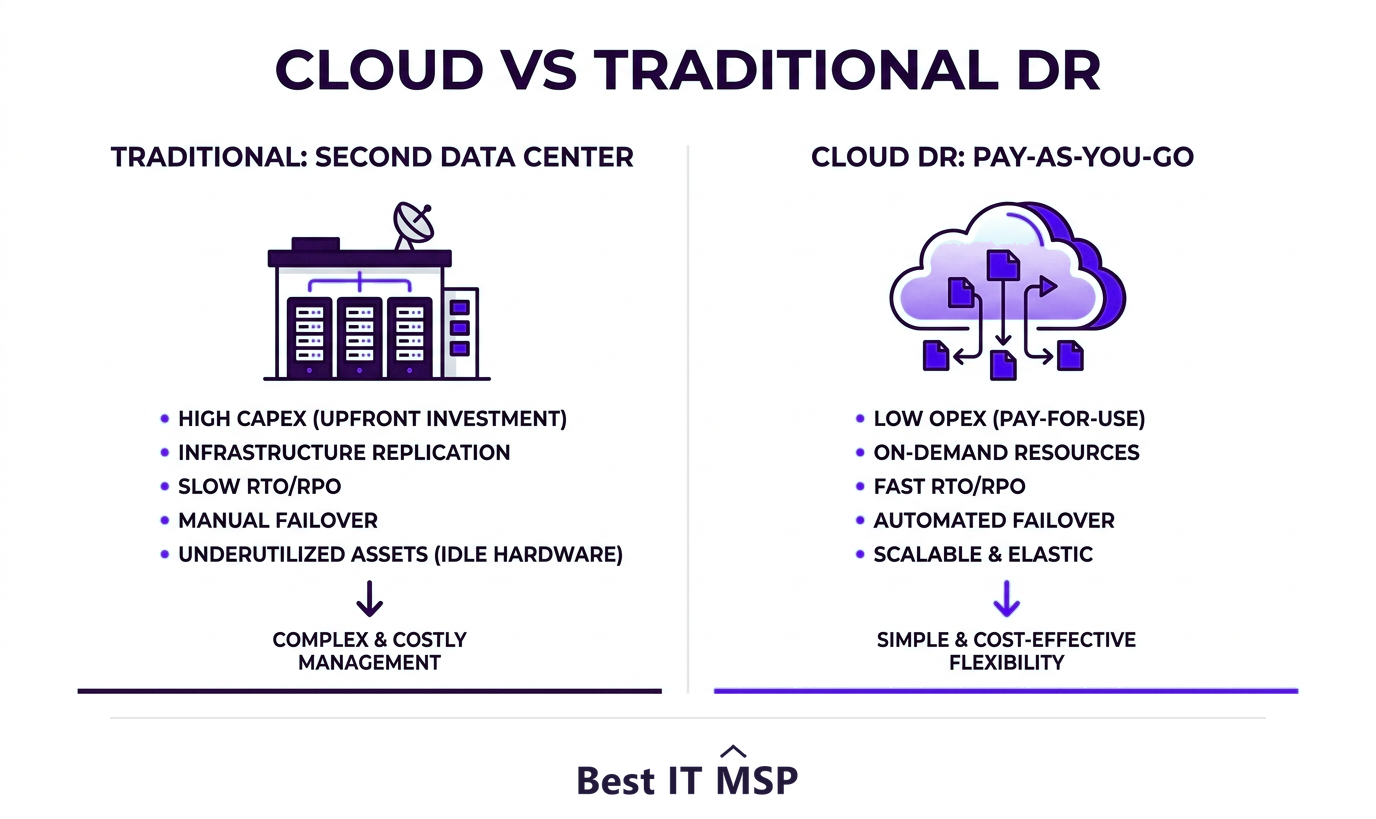
- <strong>Lower cost.</strong> No second data center to buy and run; you pay mainly for storage and for compute only when you recover.
- <strong>Faster recovery.</strong> Software-driven failover can restore systems in minutes rather than days.
- <strong>Easier testing.</strong> You can spin up an isolated copy and test failover without disrupting production, so you actually know the plan works.
- <strong>Scalability and reach.</strong> Geographic redundancy across cloud regions protects against even a regional disaster, something few businesses could build themselves.
What is DRaaS?
Disaster Recovery as a Service (DRaaS) is cloud DR delivered as a fully managed subscription. Instead of building and running the replication, failover, and testing yourself, a provider handles it for a predictable monthly fee, including the expertise to design the plan and the responsibility to execute recovery when disaster strikes. For most small and midsize businesses, DRaaS is the practical way to get enterprise-grade disaster recovery without enterprise staff, especially given a global shortfall of about 4.8 million cybersecurity and IT professionals that makes specialist DR skills hard to hire. It turns disaster recovery from a project you might never finish into a service that is simply always on.
How to build a cloud disaster recovery plan
A good plan is built deliberately, not assembled after a scare. Start by identifying your critical systems and data, the ones the business genuinely cannot run without, and rank them by priority. Set an RTO and RPO for each based on business impact. Choose a cloud DR or DRaaS solution that can meet those targets, and configure replication accordingly. Document the recovery procedure clearly, including who does what, so recovery does not depend on one person's memory during a crisis. Then, crucially, test it: run regular failover tests to confirm systems actually come back, and fix whatever the tests reveal.
That last point is where most disaster recovery fails in practice. Many businesses have a plan on paper and backups they have never tried to restore, then discover during a real disaster that the backups were incomplete or the failover does not work. A plan you have never tested is a hope, not a plan. Regular, realistic testing is the single habit that separates businesses that recover from those that do not.
Getting cloud DR right
Cloud disaster recovery has made true business resilience affordable for almost everyone, but it still has to be designed, configured, and tested correctly to deliver on its promise. As more systems move to the cloud, in a market where public cloud spending is forecast to top $723 billion in 2025, up from about $595.7 billion in 2024, the tools are powerful and accessible, yet the gap between a plan that works and one that merely exists is wide. Many businesses close that gap with a managed provider, part of why the managed services market is projected to grow from about $330 billion in 2024 to about $879 billion over the next decade. A provider sets your RTO and RPO with you, runs the replication and testing, and is accountable for recovery when it counts.
If you want disaster recovery you can actually rely on, start with a provider who will test it, not just sell it. Browse vetted, merit-ranked firms by city in the Best IT MSP directory, where ranking is earned on rating and verified data.
FAQ
What is cloud disaster recovery?
Cloud disaster recovery (cloud DR) is keeping copies of your critical systems and data replicated in the cloud so that, after an outage, attack, or disaster, you can quickly fail over to the cloud copies and keep running. The goal is to recover as fast as possible with as little data loss as possible, and the cloud makes this affordable for businesses of every size.
How does cloud disaster recovery work?
Cloud DR continuously replicates your servers, applications, and data to a cloud environment that stands ready to take over. When a disaster hits your primary site, you fail over and users connect to the cloud copies, often within minutes. Once the primary site is repaired, you fail back. Because cloud compute is on demand, you avoid running a full duplicate environment around the clock.
What are RTO and RPO?
RTO (Recovery Time Objective) is how quickly you must be back up after a disaster, and RPO (Recovery Point Objective) is how much data you can afford to lose, measured in time. Tighter targets mean less downtime and data loss but higher cost. Setting RTO and RPO per system, based on business impact, is how you balance protection against cost.
How is cloud DR different from traditional disaster recovery?
Traditional DR required building and maintaining a second physical data center, which was expensive, complex, and often untested. Cloud DR is cheaper because you pay mainly for storage and for compute only during recovery, faster because failover is software-driven, easier to test without disrupting production, and more resilient through geographic redundancy across cloud regions.
What is DRaaS (Disaster Recovery as a Service)?
DRaaS is cloud disaster recovery delivered as a fully managed subscription. A provider handles the replication, failover, testing, and the expertise to design and execute recovery, for a predictable monthly fee. It lets small and midsize businesses get enterprise-grade disaster recovery without hiring scarce specialist staff or building the infrastructure themselves.
How do I build a cloud disaster recovery plan?
Identify your critical systems and data and rank them by priority, set an RTO and RPO for each based on business impact, choose a cloud DR or DRaaS solution that can meet those targets, configure replication, document the recovery procedure clearly, and test it regularly with failover tests. Testing is essential, because a plan you have never tested is a hope, not a plan.
Best IT MSP is the independent directory of vetted managed IT providers across North America. Compare merit-ranked firms in your city that design, run, and test cloud disaster recovery. No pay-to-play.