Service Desk Best Practices
A service desk is the single point of contact between IT and the business, broader than a help desk because it manages requests and IT service delivery, not just break-fix tickets.
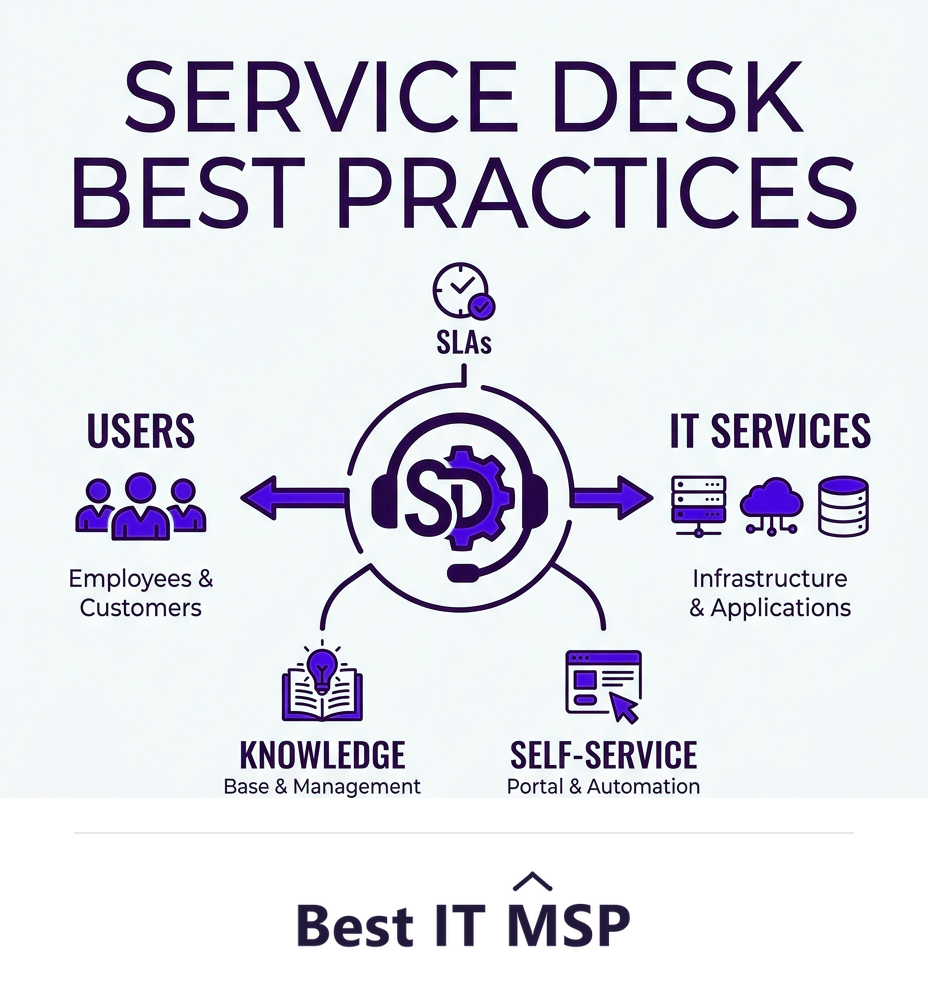
- A service desk is the single point of contact for all IT, broader than a tactical help desk.
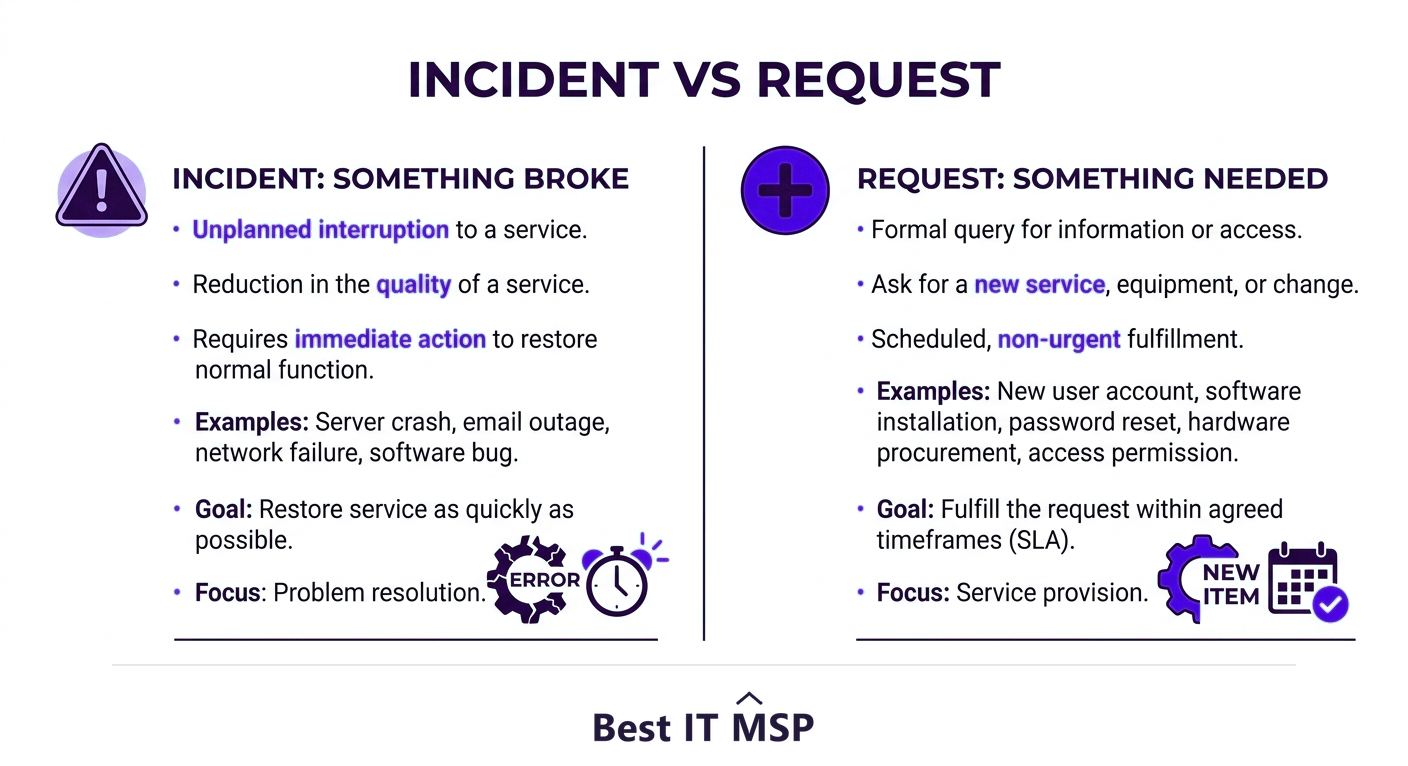
- Separate incidents (something broken) from service requests (something needed) and handle each well.
- Use SLAs, a strong knowledge base, and self-service to resolve issues fast and consistently.
- Automate routine requests and shift knowledge left so issues are solved earlier and cheaper.
- Treat the service desk as a continually improving process, measured and refined over time.
What is a service desk, and how is it different from a help desk?
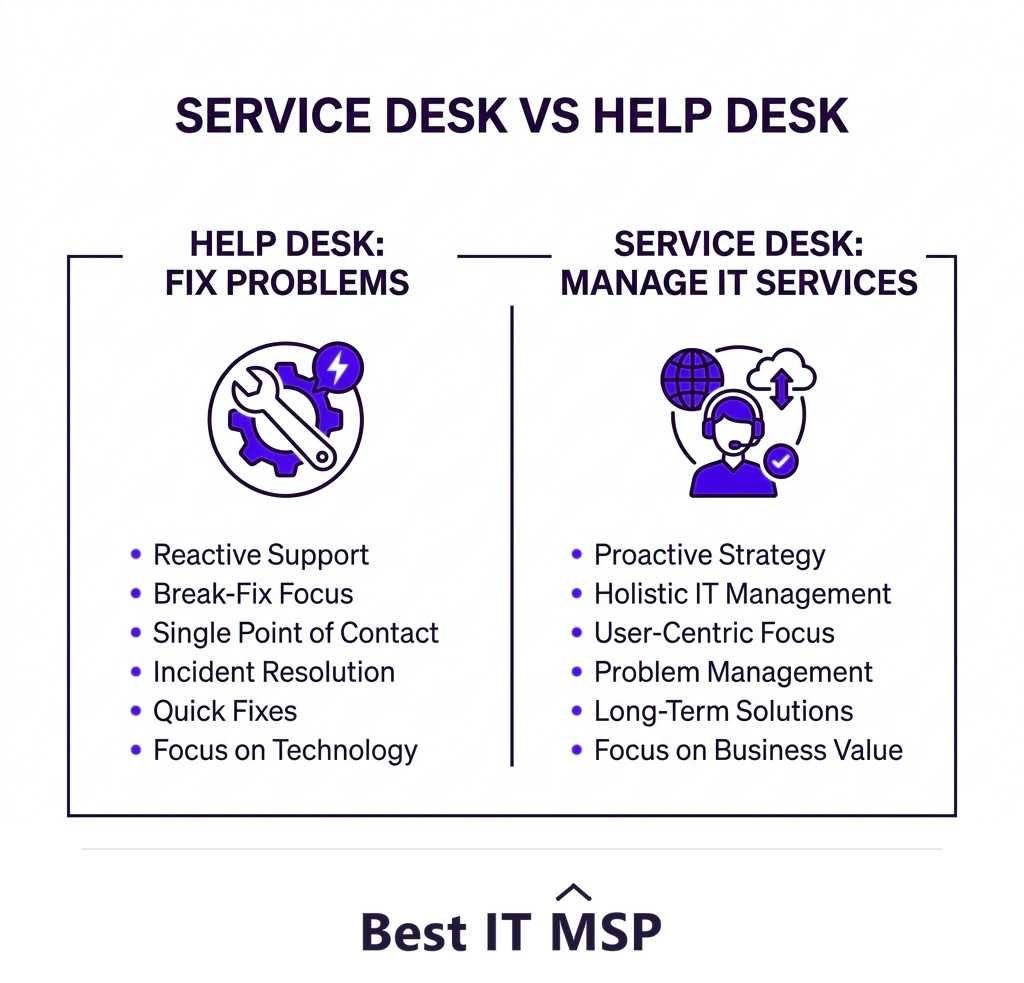
A service desk is the single point of contact between an IT organization and the people it serves, the front door for everything IT-related. It is often confused with a help desk, and the distinction matters. A help desk is tactical and focused on fixing problems, resolving incidents and answering questions. A service desk is broader: it manages the full delivery of IT services, handling not just incidents but service requests (like provisioning a new laptop or granting access), and connecting support to the wider processes of IT service management (ITSM). In short, a help desk fixes things; a service desk manages how IT serves the business.
Getting the service desk right has an outsized effect, because it shapes how the entire organization experiences IT and how quickly problems are resolved before they become costly, an important point when an hour of downtime costs most organizations more than $100,000. This guide covers the best practices that make a service desk genuinely effective. It pairs with our IT help desk services and IT support services overviews, and complements our guide to help desk best practices.
1. Be a true single point of contact
The foundational best practice is to genuinely be the single point of contact for all IT needs. Users should know there is one place to go, by phone, chat, email, or portal, for anything technology-related, rather than chasing individual technicians or guessing who to ask. A single point of contact ensures nothing falls through the cracks, gives the business one consistent experience, and lets the service desk capture, route, and track every interaction. When people bypass the desk and grab a colleague in IT directly, work goes untracked and the data that drives improvement is lost.
2. Separate incidents from service requests
Not all tickets are the same, and treating them the same causes problems. An incident is something broken that needs restoring (email is down, a laptop will not start); a service request is something the user needs (a new account, software, access). They have different urgency, different workflows, and different SLAs. Distinguishing them lets you prioritize correctly, an outage gets immediate attention while a routine request follows a standard fulfillment process, and report meaningfully on each. This separation is a core ITSM principle for good reason: it keeps urgent problems from being buried under routine asks.
3. Set and honor SLAs
Service level agreements define the response and resolution times users can expect, usually tiered by priority so a critical outage is handled faster than a low-priority request. SLAs set expectations for users and give the team clear, measurable targets. The key is not just to set them but to honor and track them: a service desk that consistently meets its SLAs builds trust, while one that quietly misses them erodes it. Use your tooling to flag tickets approaching an SLA breach so nothing slips, and review SLA performance regularly to spot where the desk is struggling.
4. Build knowledge and shift it left
A strong knowledge base, documented solutions and procedures, is central to an efficient service desk. It lets agents resolve issues faster and more consistently, speeds up onboarding of new staff, and captures hard-won fixes so they are reused rather than rediscovered. The advanced version of this is shift-left: pushing knowledge and resolution capability as close to the user as possible. That means front-line agents resolve more (rather than escalating), and users resolve the simplest issues themselves through self-service. Shifting left lowers cost and speeds resolution, because the earlier and closer to the user a problem is solved, the cheaper it is.
5. Enable self-service and automation
The most efficient service desks deflect routine work from human agents. A self-service portal lets users find answers, reset passwords, and submit common requests on their own, instantly and at any hour. Automation handles the predictable parts of fulfillment, routing tickets, provisioning standard access, running approval workflows, so agents focus on the issues that genuinely need human judgment. Together, self-service and automation let a service desk handle far more volume without proportionally more staff, which matters as the business grows and as skilled IT staff remain scarce amid a global shortfall of about 4.8 million cybersecurity and IT professionals.

6. Focus on people and communication
A service desk is judged as much on experience as on technical resolution. Train agents in both technical skills and communication, and set a standard of clear, prompt, empathetic interaction: acknowledge tickets quickly, keep users informed of progress, and explain resolutions in plain language. Because the service desk is a frequent target of social-engineering attacks, agents also need security awareness, verifying identity before resetting credentials or granting access, since the human element features in 68 percent of breaches and the average breach costs $4.88 million and takes about 258 days to identify and contain. A well-trained, security-conscious desk protects the business as well as serving it.
7. Measure and continually improve
The best service desks treat themselves as a process to be continually improved, an idea ITSM frameworks call continual service improvement. Track the metrics that reveal real performance: resolution and response times, first-contact resolution, SLA compliance, ticket volumes and trends, and user satisfaction. Then act on them. Use ticket trends to find recurring problems worth eliminating at the root, identify training gaps, and refine processes over time. Improvement is never finished, but a desk that reviews its data and adjusts steadily becomes increasingly proactive, fixing root causes before they generate tickets, while one that just works tickets stays stuck reacting. That proactive shift, from closing tickets to preventing them, is the mark of a mature service desk. Watch trends rather than fixating on any single number.
Building a service desk that delivers
Putting all of this in place, the tooling, the ITSM processes, the knowledge base, self-service, automation, trained staff, and a culture of improvement, is a significant undertaking, and running it well around the clock is hard for a small or midsize business. This is why many outsource the service desk to a managed IT provider that already operates a mature, ITSM-aligned desk with these practices built in. It is part of why the managed services market is projected to grow from about $330 billion in 2024 to about $879 billion over the next decade, as more of business runs on cloud services that need responsive support, in a market where public cloud spending is forecast to top $723 billion in 2025, up from about $595.7 billion in 2024.
Whether you build your service desk in-house or outsource it, these practices are what separate one the business trusts from one it works around. To find a provider with a strong, ITSM-aligned service desk, browse vetted, merit-ranked firms by city in the Best IT MSP directory, where ranking is earned on rating and verified data.
FAQ
What is the difference between a service desk and a help desk?
A help desk is tactical, focused on fixing problems by resolving incidents and answering questions. A service desk is broader: it is the single point of contact that manages the full delivery of IT services, handling both incidents and service requests and connecting to wider IT service management processes. In short, a help desk fixes things; a service desk manages how IT serves the business.
What are service desk best practices?
Key best practices are being a true single point of contact, separating incidents from service requests, setting and honoring SLAs, building a knowledge base and shifting resolution left toward the user, enabling self-service and automation, training staff in technical and communication skills with security awareness, and continually measuring and improving based on metrics.
What is the difference between an incident and a service request?
An incident is something broken that needs restoring, such as email being down or a laptop that will not start. A service request is something the user needs, such as a new account, software, or access. They have different urgency, workflows, and SLAs, so separating them lets the desk prioritize correctly and report meaningfully on each.
What is shift-left in a service desk?
Shift-left means pushing knowledge and resolution capability as close to the user as possible: front-line agents resolve more issues instead of escalating, and users handle the simplest issues themselves through self-service. It lowers cost and speeds resolution, because the earlier and closer to the user a problem is solved, the cheaper and faster it is.
How do you measure service desk performance?
Track resolution and response times, first-contact resolution rate, SLA compliance, ticket volumes and trends, and user satisfaction. Then act on the data, using ticket trends to find recurring problems to eliminate at the root, identifying training gaps, and refining processes. Watch trends over time rather than fixating on any single number, an approach ITSM calls continual service improvement.
Should a business outsource its service desk?
Many small and midsize businesses do, because building and running a mature, ITSM-aligned service desk with the right tooling, processes, and staffing, especially around the clock, is hard and expensive. A managed IT provider operates such a desk with best practices built in, giving the business responsive, professional support without building the operation itself.
Best IT MSP is the independent directory of vetted managed IT providers across North America. Compare merit-ranked firms in your city that run mature, ITSM-aligned service desks. No pay-to-play.