The Employee Offboarding IT Checklist: Closing Access Before It Costs You
IT offboarding fails in predictable places: shared logins nobody owns, software-as-a-service accounts bought outside IT, personal devices holding company data, and forwarding rules left running. Revoke identity first, because disabling the account closes most doors at once. Then work through devices, data and the third-party accounts your directory never knew about.
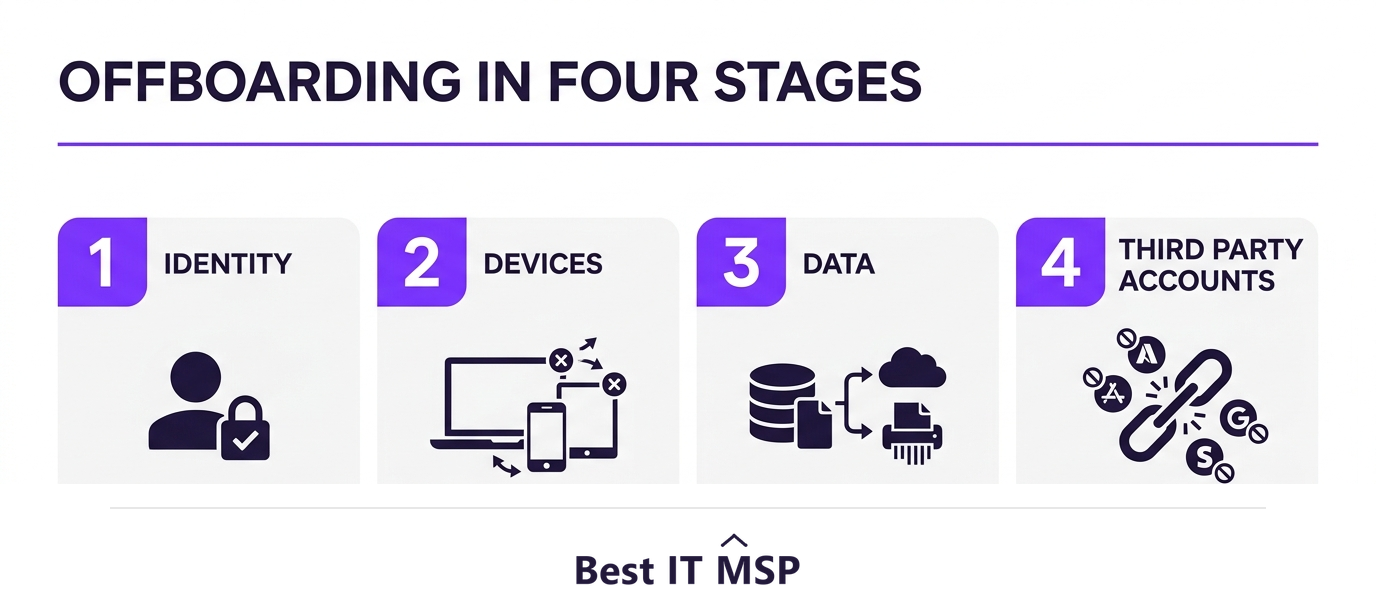
- Disable the identity first. In a well-run tenant that single action closes most connected applications at once.
- Disable, do not delete. Deleting an account can destroy mailbox contents and the audit trail you may need later.
- The accounts that outlive people are the ones bought on a departmental card and never registered with IT.
- Check mail forwarding rules and app passwords. Both survive a password reset and quietly keep data flowing.
- Offboarding is the same control set as onboarding, run backwards. If joiner-mover-leaver is not documented, that is the real gap.
Why offboarding is the control most often skipped
Onboarding gets attention because someone is waiting to start work. Offboarding gets attention only until the laptop is back on the desk, and the accounts quietly outlive the person.
The risk is not usually a disgruntled ex-employee. It is an orphaned account with a password that never expires, no multi-factor authentication, and nobody monitoring it. CISA publishes Insider Threat Mitigation guidance covering exactly this class of risk: people with authorised access to an organisation's systems and data, whether or not they intend harm.
It is also a baseline expectation rather than an advanced practice. CISA's Cross-Sector Cybersecurity Performance Goals include revoking credentials on personnel departure as a prioritised baseline, and the CIS Critical Security Controls place inventory and control of enterprise assets and accounts among the first and most fundamental controls.
Stage one: identity, and why it comes first
Start with the directory account, because in a well-configured Microsoft 365 or Google Workspace tenant, disabling it closes most connected applications at the same time. Everything else in this checklist is cleaning up what single sign-on does not cover.
- Disable the account, do not delete it. Deletion can destroy mailbox contents, file ownership and the audit trail you may need later. Disable now, decide about deletion after your retention period.
- Revoke active sessions and refresh tokens. A disabled account can still have a live session on a phone until the token expires.
- Reset the password anyway, so any cached credential stops working.
- Remove multi-factor authentication devices registered to that person, so a re-enabled account cannot be claimed with their old phone.
- Check for delegated access, such as mailbox delegation or shared calendar rights granted to them.
While you are in there, confirm multi-factor authentication is enforced across the remaining accounts. Multi-factor authentication blocks over 99.9% of account compromise attacks, and a departure is a natural moment to close gaps you had tolerated.
Stage two: devices and physical access
Devices are the visible part and therefore the part that usually gets done. The gaps are the ones that were never on an asset list.
- Recover the laptop, phone, tablet and any hardware security keys.
- Remove the device from your management platform, and wipe or re-image before reissue.
- Handle personal devices explicitly. If a phone had company mail on it, remove the work account or issue a selective wipe.
- Collect physical items: access cards, keys, and anything that opens a door or a cabinet.
- Check for home equipment: a router, a monitor, a backup drive that never appeared on an inventory.
Personal devices are the common failure. Somebody's phone keeps syncing mail for months because nobody thought of it as company hardware.
Stage three: the six things almost everyone misses
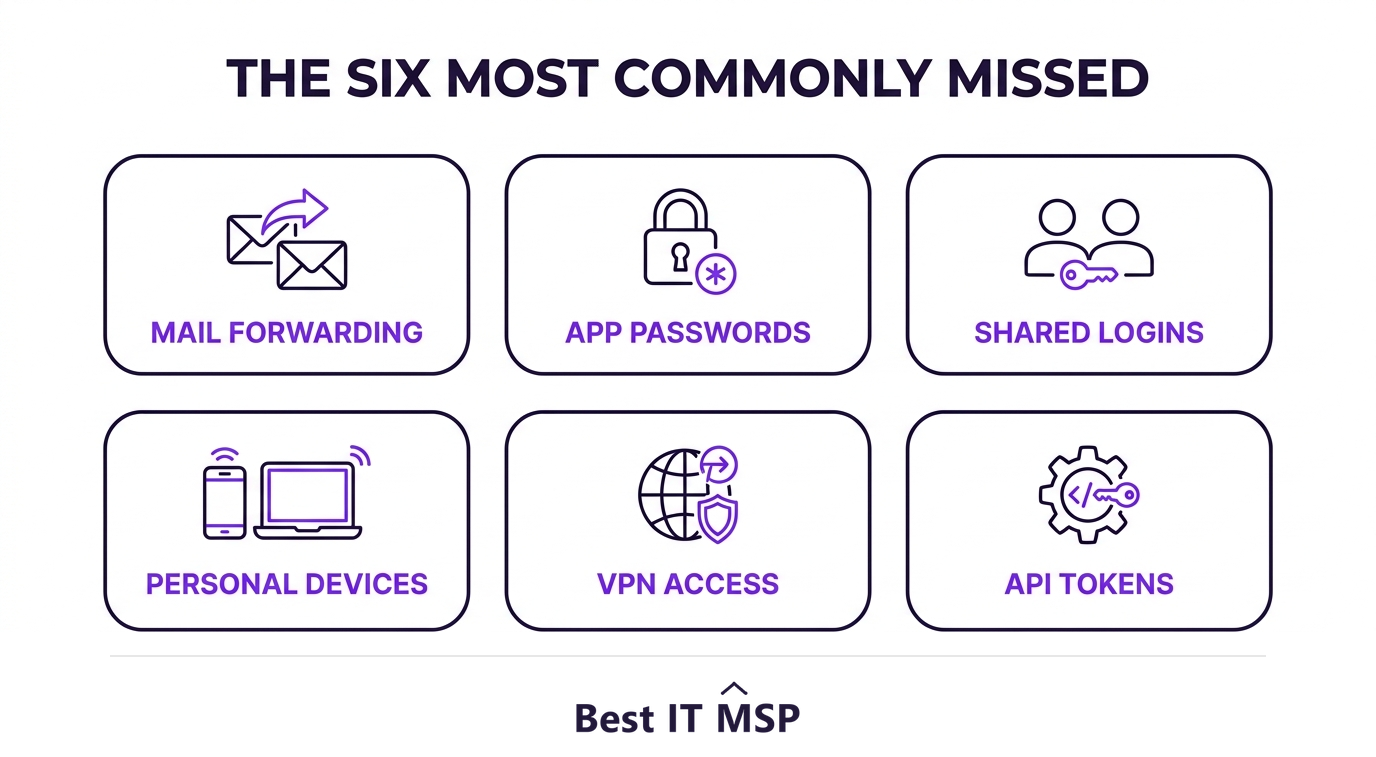
These are the access paths that survive a password reset and a disabled account, which is exactly why they get missed.
- Mail forwarding rules. A rule quietly copying mail to a personal address keeps working after the person leaves. Check inbox rules and tenant-level forwarding.
- App passwords and legacy authentication. Application-specific passwords bypass multi-factor authentication and often survive a reset.
- Shared logins. The account for the shipping portal that six people use with one password. If a leaver knew it, it has to change.
- Personal devices with saved sessions, including browser-stored passwords for company systems.
- VPN and remote access accounts, which sometimes live outside the main directory entirely.
- API tokens and integrations created under their name, which keep running after the human account is gone.
That last one connects to a wider weakness. Fewer than half of organisations secure non-human identities such as service accounts and automation credentials. An integration created by a departing developer is precisely that kind of identity.
Newer categories keep appearing too. Almost 60% of small businesses now use artificial intelligence for business operations, up from 40% in 2024, which adds another set of logins, often bought on a card rather than through IT.
Stage four: data, and what it is worth
Before closing anything, work out what the person had access to and make sure the business keeps it.
- Transfer ownership of files, folders and shared drives to a named colleague.
- Convert the mailbox to a shared mailbox or set delegated access, rather than deleting it.
- Reassign any documents, tickets or records where they were the only owner.
- Note anything they created that lives outside your systems, such as a personal cloud drive used for work.
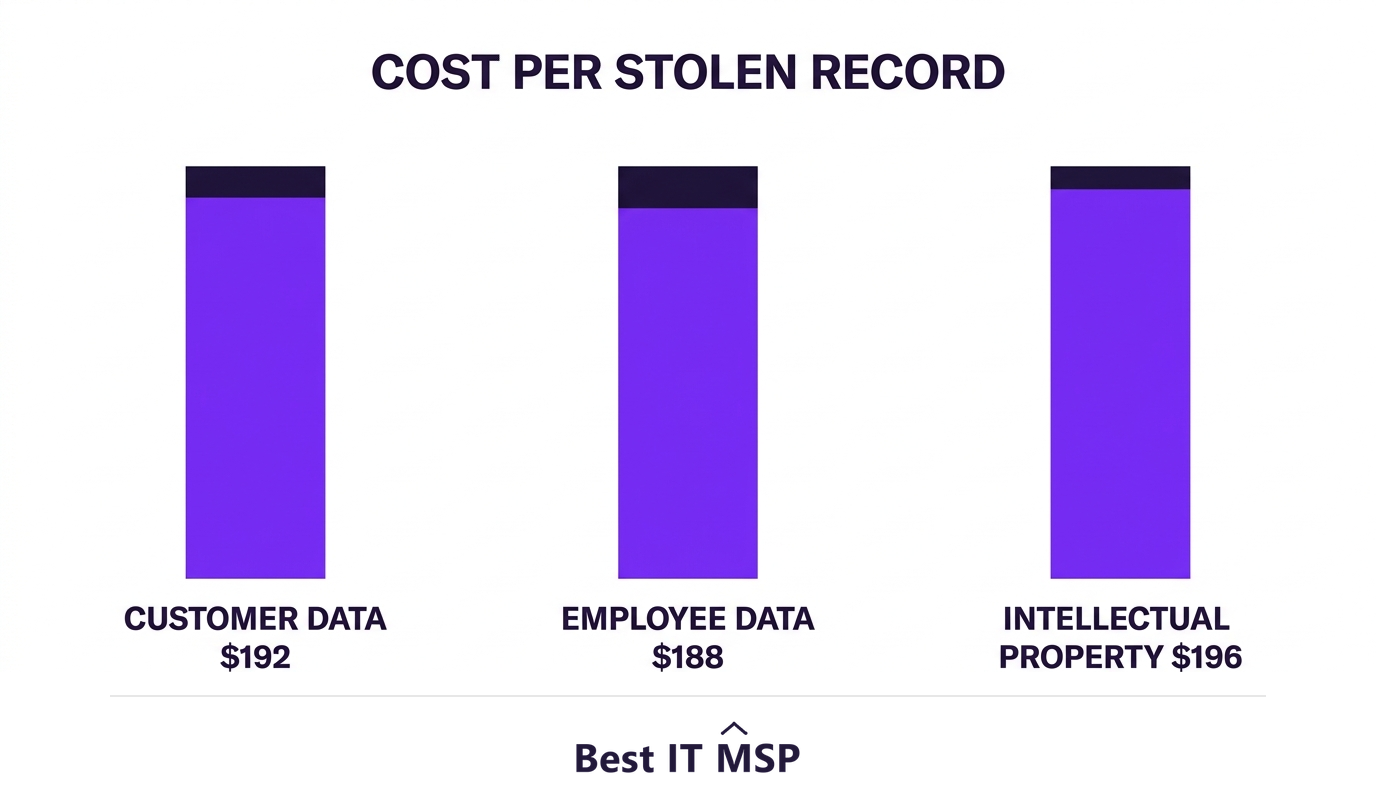
The financial case is straightforward. Intellectual property was compromised in nearly a third of breaches (32%), and was the costliest data type at USD 196 per record. Customer personal information appeared in 52% of breaches at USD 192 per record, and employee personal information in 35% at USD 188 per record.
Set against a record global average breach cost of USD 4.99 million, up 12% year over year, an hour of offboarding discipline is cheap.
Timing: do it with the conversation, not after it
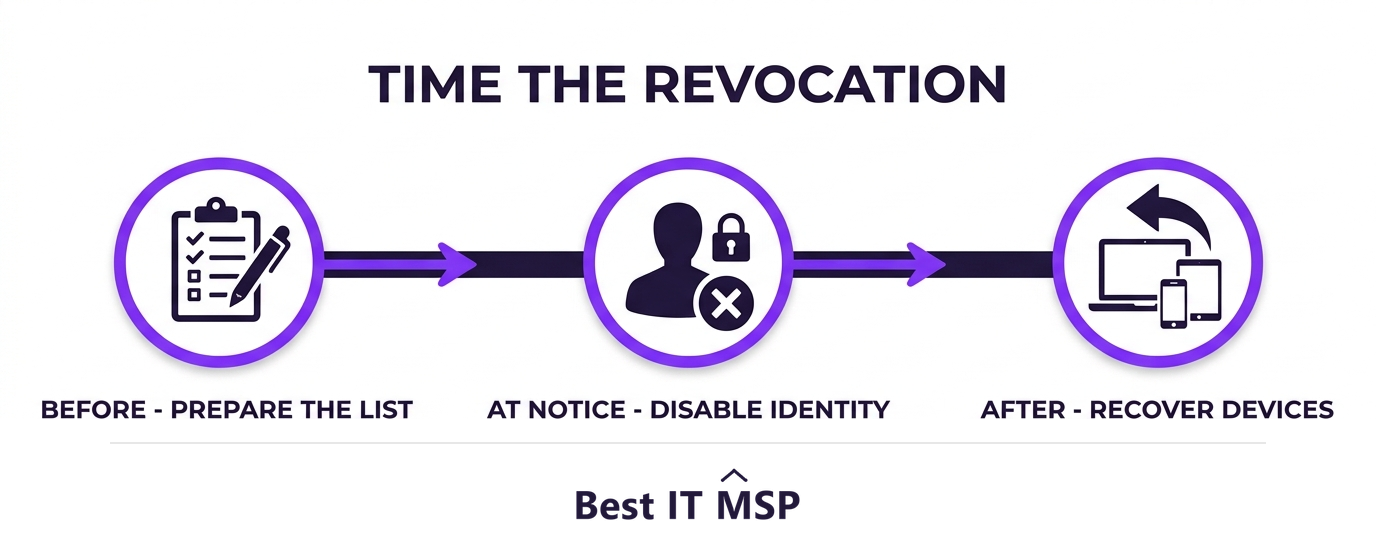
Sequence matters more than speed. Prepare the checklist before the person is told, execute identity revocation at the moment they are told, and handle device recovery afterwards.
For a resignation with a notice period, most businesses reasonably keep access until the last day. In that case reduce privileges rather than leaving everything open: remove administrative rights, restrict bulk export, and increase monitoring on their account for the notice period.
For a dismissal, access should end as the conversation happens. Coordinating that between HR and IT is the whole trick, and it needs to be agreed in advance rather than improvised.
The reason to be prompt is that nobody is watching an orphaned account. Organisations took a mean of 247 days to identify and contain a breach, and an unused account generates no complaints to shorten that.
Make it a process, not a favour
If offboarding depends on someone remembering, it will fail on the busy week. Turn it into a documented joiner-mover-leaver process with three properties.
- A trigger. HR notifies IT automatically when a departure is confirmed, not when someone gets round to it.
- A written checklist with a named owner for each item, kept with your asset inventory rather than in one person's head.
- Evidence. A record of what was revoked and when, which is what an auditor, insurer or investigator will ask for.
Then audit it. Once a quarter, list every enabled account and match it against your current staff list. The accounts with no matching human are your answer, and there are almost always some.
This is reasonable work to expect from a managed IT provider. Ask whether offboarding is included in your agreement, what their turnaround is, and whether they will provide the evidence record. If it is billed as an ad-hoc request each time, expect it to be skipped when budgets are tight. The NIST Small Business Cybersecurity Corner is a useful neutral reference if you want to justify the ask.
One thing to keep in proportion: 31% of breaches now start with the exploitation of software vulnerabilities, overtaking stolen credentials as the leading initial access vector. Offboarding discipline matters, and it sits alongside patching rather than replacing it.
FAQ
What should be on an IT offboarding checklist?
Four stages: disable the directory identity and revoke sessions, recover and wipe devices, transfer data ownership, then close third-party and shared accounts. Add the commonly missed items: mail forwarding rules, app passwords, shared logins, VPN accounts and API tokens.
Should I delete a departing employee's account?
Disable it first, do not delete. Deletion can destroy mailbox contents, file ownership and the audit trail you may later need. Convert the mailbox to shared or delegate access, then decide about deletion once your retention period has passed.
When should access be revoked?
At the moment the departure is communicated. For a resignation with notice, reduce privileges instead of removing access entirely: strip administrative rights, restrict bulk export and monitor the account until the last day. For a dismissal, revoke as the conversation happens.
What gets missed most often in offboarding?
Mail forwarding rules, application-specific passwords that bypass multi-factor authentication, shared logins that several people use, personal devices with saved sessions, standalone VPN accounts, and API tokens or integrations created under the person's name.
How do I find accounts belonging to people who already left?
Run a quarterly review comparing every enabled account against your current staff list. Anything without a matching person is an orphaned account. Include software-as-a-service tools bought outside IT, since those rarely appear in your directory.
Should my IT provider handle offboarding?
Most can, but check whether it is included in your agreement or billed ad hoc. Ask about turnaround time and whether they provide a written record of what was revoked and when, since that evidence is what an auditor or insurer will ask for.
Best IT MSP is the independent, researched ranking of managed IT providers in every city. Compare on verified ratings, then ask each shortlisted provider what their offboarding turnaround is and what evidence they hand back.