Access Point vs Router: What Is the Difference?
A router connects your network to the internet and directs traffic between devices and networks. An access point (AP) does one job: it provides WiFi, extending wireless coverage from a network the router already created.
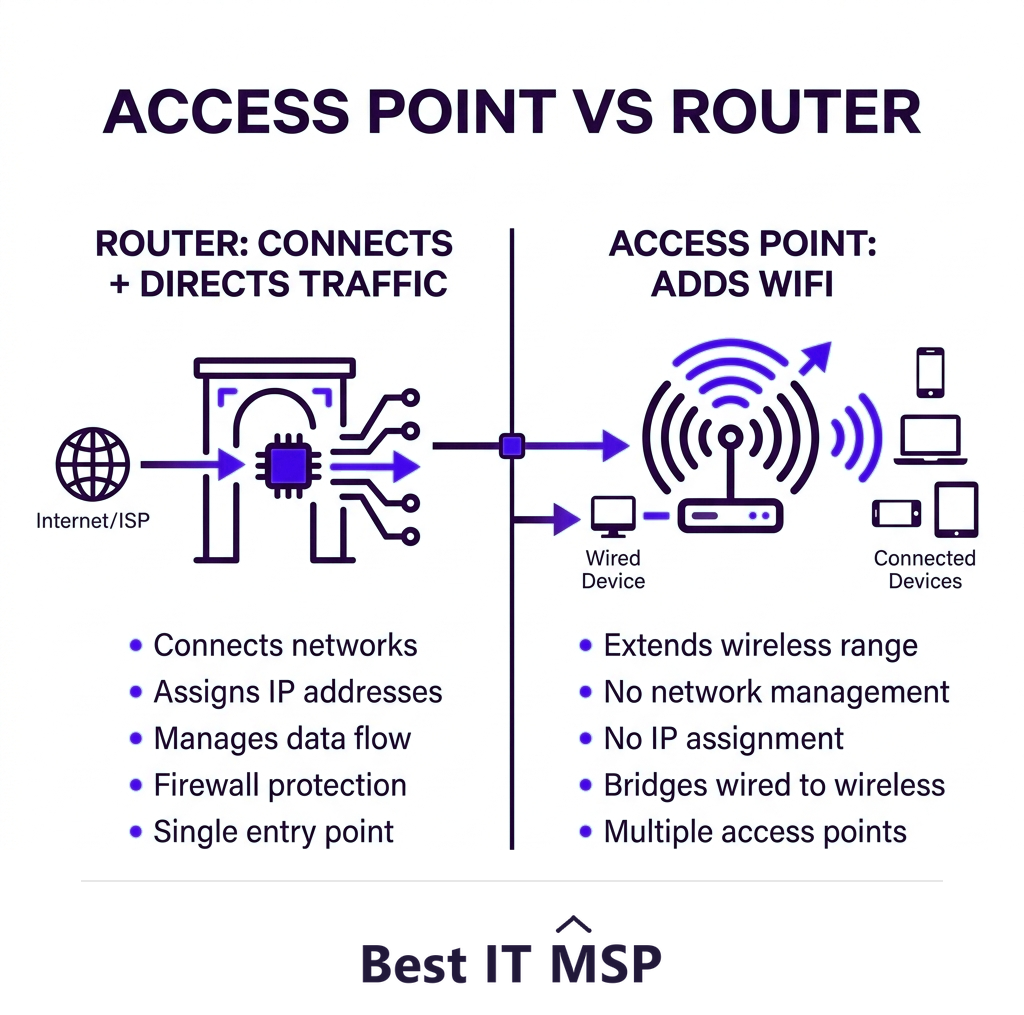
- A router connects networks and directs traffic; it is the gateway to the internet.
- An access point only provides WiFi, extending coverage from a network the router created.
- Every network needs a router; access points are added for more wireless coverage.
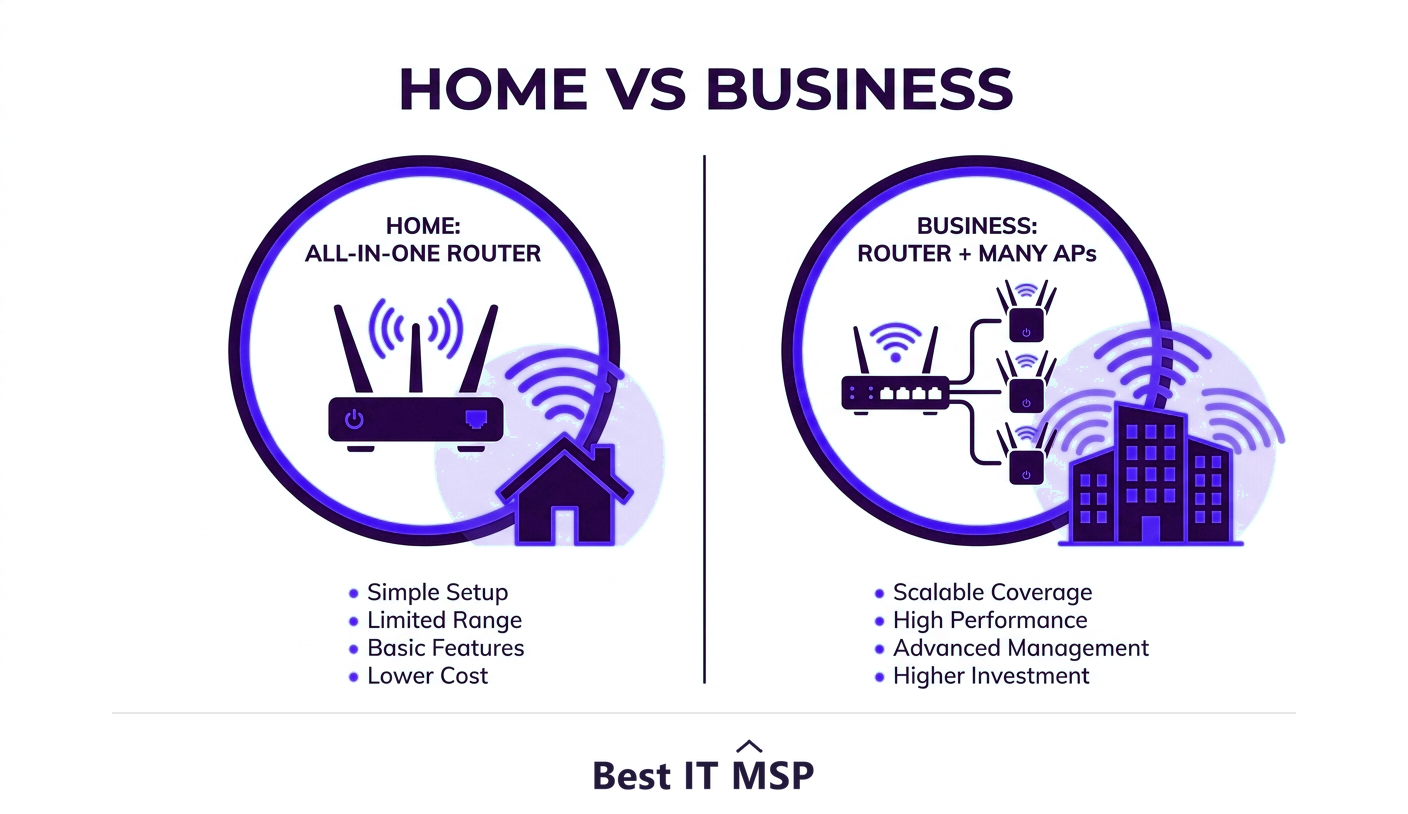
- Home all-in-one routers combine routing and WiFi; businesses usually separate them for scale.
- For reliable business WiFi across a space, multiple access points beat one stronger router.
How did we compare access points and routers?
By what each device is for, because the honest answer here is that you need both, and the real question is how many of one.
- The dimensions. What each device does, where it sits, what breaks without it, and how each scales as a building fills.
- The evidence. Spectrum rules come from the FCC, downtime cost from ITIC and breach cost from IBM, cited where the argument turns on them.
- No vendor ranking. This compares approaches, not products. It names no vendors and recommends no supplier.
- Independence. Best IT MSP does not sell IT services or security services, and does not appear in its own rankings.
What is the difference between an access point and a router?
These two devices are often confused because in a typical home they are bundled into one box, but they do fundamentally different jobs. A router is the gateway: it connects your local network to the internet and directs traffic between devices and between networks, deciding where data should go. An access point (AP) does just one thing: it provides WiFi, broadcasting a wireless signal so devices can join a network that already exists. Put simply, the router creates and runs the network; the access point extends that network over WiFi. Every network needs a router to function; access points are added when you need more wireless coverage than the router alone can provide.
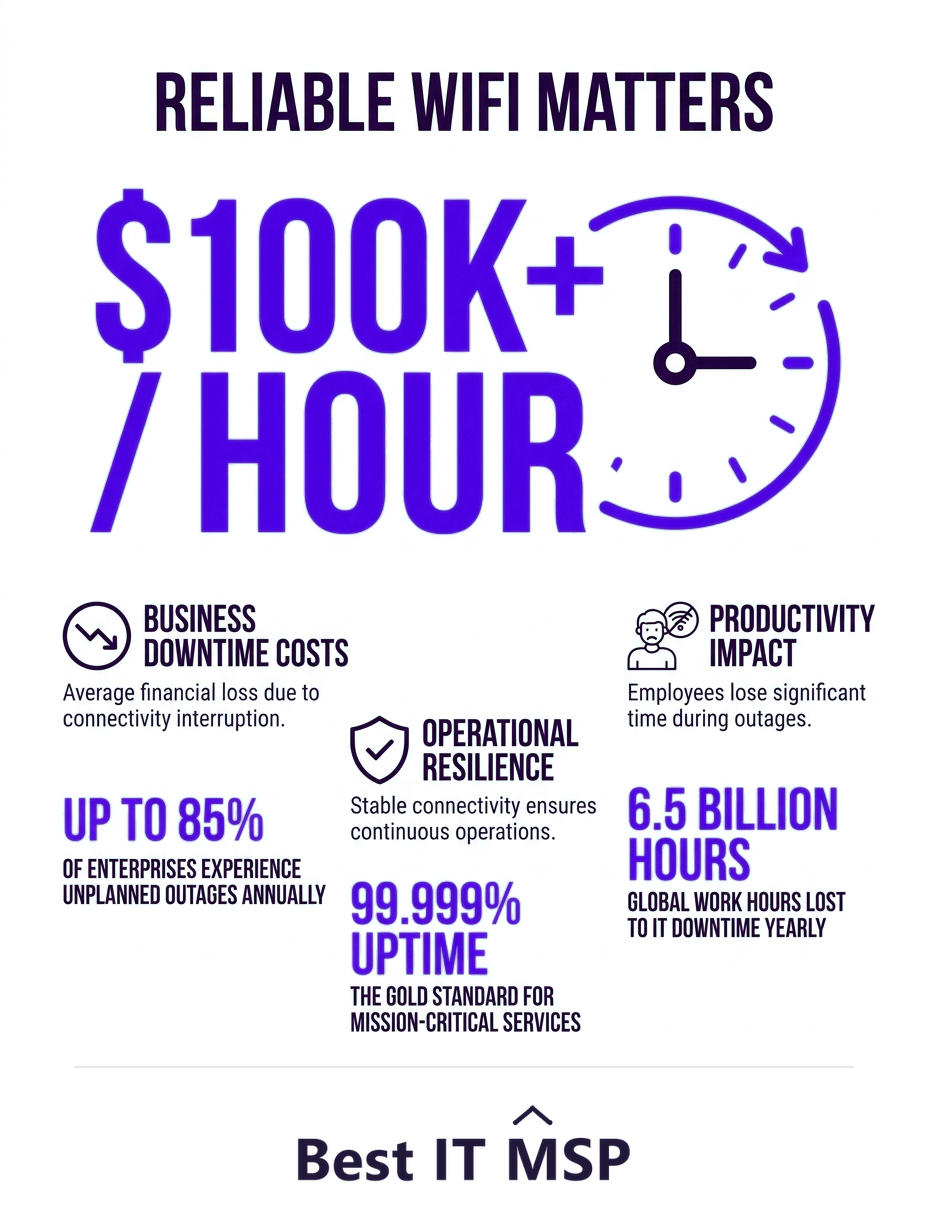
Understanding the difference matters because it determines how you build reliable WiFi, especially in a business, where dead zones and dropped connections cost real productivity against a backdrop where an hour of downtime costs most organizations more than $100,000. This guide explains what each device does, how they work together, and which you need. It pairs with our network support services overview.
What does a router do?
A router is the brain and gateway of your network. Its core jobs are connecting your network to the internet (via your modem), assigning addresses to your devices (DHCP), and routing traffic, directing data between your devices and out to the internet and back, taking the right path. It also typically provides the network's security functions, like a firewall, and network address translation that lets many devices share one internet connection. In a home, the router usually also includes built-in WiFi, which is why people think of the router as the WiFi box. But routing and providing WiFi are two separate functions that happen to be combined in consumer gear.
What does an access point do?
An access point has one job: to provide wireless connectivity. It connects to the router (usually by an Ethernet cable) and broadcasts a WiFi signal that devices connect to, effectively extending the router's network into the airspace around it. An AP does not route traffic, assign addresses, or connect to the internet on its own; it relies on the router for all of that. Think of the router as the source of the network and the access point as a WiFi antenna for it, placed wherever you need coverage. Because an AP only adds wireless reach, you can deploy several of them across a building to blanket the whole space in strong WiFi.
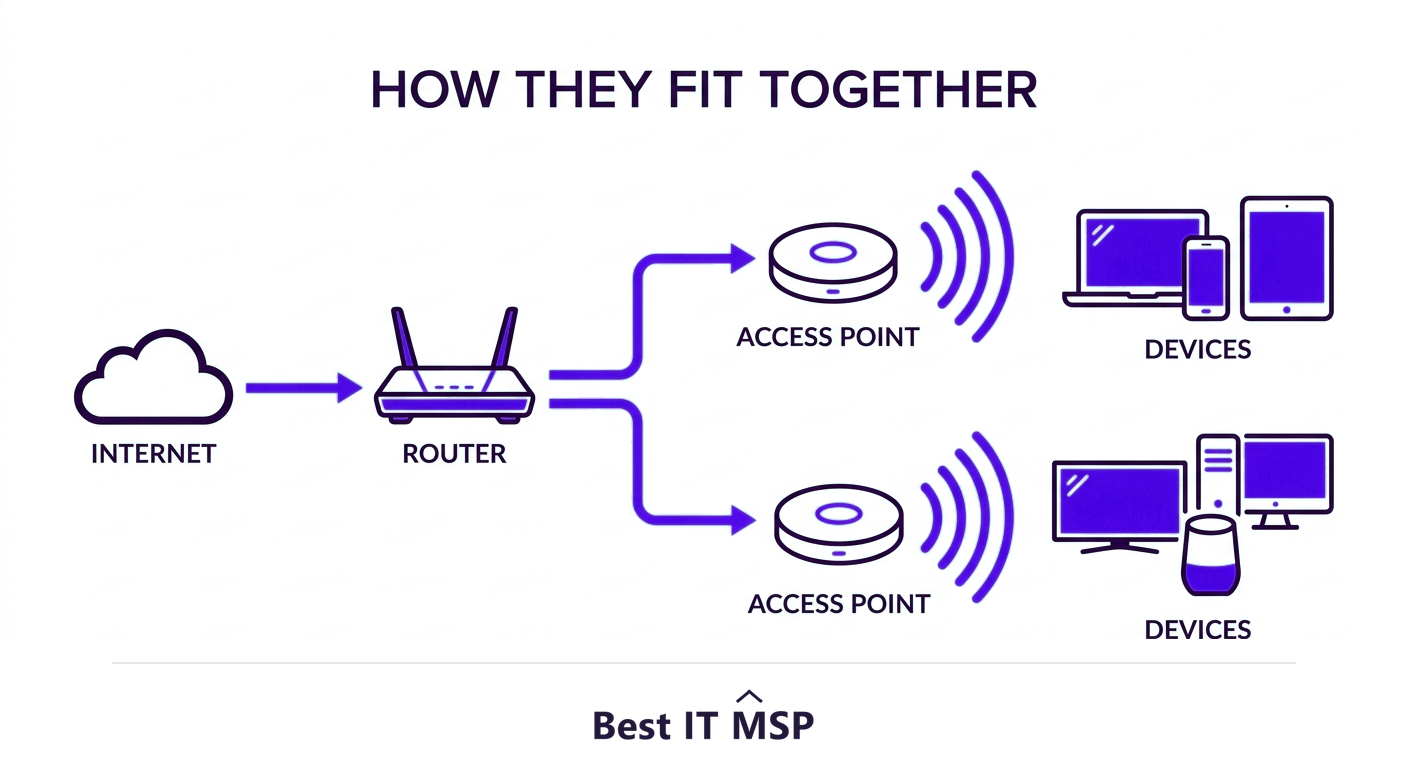
How do a router and an access point work together?
In a real network, the pieces connect in a chain: the internet comes in through a modem, the modem connects to the router, and the router connects to one or more access points that broadcast WiFi to your devices. The router runs the network and manages traffic; the access points simply spread its WiFi coverage. In a small home, all of this is collapsed into a single all-in-one router with built-in WiFi, which is plenty for a small space. In a larger home or any business, you separate the functions: a capable router (or router plus switch) handles the network, and multiple access points provide even, strong coverage everywhere people work.
| Dimension | Router | Access point |
|---|---|---|
| Its job | Connects your network to the internet and directs traffic | Provides WiFi over an area |
| Where it sits | At the edge, between your network and the internet | Inside the network the router already created |
| Remove it and | Nothing reaches the internet | You lose wireless coverage in that area, wired stays up |
| How you scale it | Usually one, sized to your connection | Add more units to cover more floor area and more devices |
| Typical count in an office | One | As many as the floor plan needs |
When do you need access points?
The trigger for adding access points is coverage. A single router's WiFi reaches only so far, and walls, floors, and distance create dead zones where the signal is weak or absent. If you have spotty WiFi in parts of a larger home, or anywhere in a business beyond a small office, the answer is usually more access points, not a single more powerful router. This is a crucial and widely misunderstood point: you cannot fix a coverage problem by buying one stronger router, because WiFi range is limited by physics and by the device on the other end. Spreading several access points across the space, each covering its area, delivers far better, more consistent WiFi than trying to blast one signal across the whole building.
- How large is the area, and what is it built from? Coverage is decided by walls and distance, not the box on the label. Concrete, foil-backed insulation and lift shafts all cost range.
- How many devices connect at once? Access points are limited by concurrent clients as much as by distance. Count everything, including whatever is on the ceiling.
- Do users move while connected? Roaming is a configuration problem, not a hardware one, and decides whether a call survives a walk to the kitchen.
- Is anything on the network that cannot move? A wired till, a machine controller or a door system dictates where cabling runs, and so where access points can go.
Why do businesses use more than one access point?
Almost every business beyond a tiny office uses a separate router and multiple access points, for good reasons. Coverage is even across the whole workspace with no dead zones. Capacity is higher, because each AP handles a share of the devices, so a crowded office does not overwhelm a single radio. And users can roam, moving through the building while their device hands off seamlessly from one AP to the next without dropping. Business-grade access points also offer central management, security features, and the ability to run separate networks (such as a guest WiFi) cleanly. This is the difference between WiFi that frustrates a growing team and WiFi that just works, which matters when downtime and lost productivity are so costly.
Capacity is not only a hardware question. In opening the 6 GHz band the FCC released 1,200 megahertz of spectrum for unlicensed use, which is the reason a current access point can carry a device count an older one could not.
What is the difference between AP mode and router mode?
You may see the terms AP mode and router mode on a device, because many consumer routers can be switched to act as a plain access point. In router mode, the device does the full job, connecting to the internet, assigning addresses, routing, and providing WiFi. In access point mode, it disables the routing functions and acts only as a WiFi broadcaster connected to your existing router. This is useful when you already have a main router and want to add coverage with a spare device, putting it in AP mode avoids the conflicts (like two devices both trying to assign addresses) that arise if you wrongly chain two routers. The mode you choose depends on whether the device is the network's gateway or just extending an existing network.
How do you get business WiFi right?
For a business, good WiFi is not a single purchase; it is a design. The right number and placement of access points, the right router and switching behind them, proper security, and central management together determine whether your wireless is reliable or a constant source of complaints. This takes expertise to plan, especially as more work depends on wireless and on the cloud, in a market where public cloud spending is forecast to top $723 billion in 2025, up from about $595.7 billion in 2024. It also has security implications, since wireless is an entry point attackers probe, and the average breach costs $4.88 million, takes about 258 days to identify and contain, with reported cybercrime losses topping $12.5 billion a year. Getting this right in-house is hard amid a global shortfall of about 4.8 million cybersecurity and IT professionals.
Most businesses get reliable, secure WiFi by having a managed IT provider design and manage the network, the router, the access points, and the security, part of why the managed services market is projected to grow from about $330 billion in 2024 to about $879 billion over the next decade. If your WiFi has dead zones or drops, a provider can design coverage that works. To find one, browse vetted, merit-ranked firms by city in the Best IT MSP directory, where ranking is earned on rating and verified data.
FAQ
What is the difference between an access point and a router?
A router is the gateway that connects your network to the internet and directs traffic between devices and networks. An access point only provides WiFi, broadcasting a wireless signal so devices can join a network the router already created. The router runs the network; the access point extends it over WiFi. Every network needs a router, while access points are added for coverage.
Do I need a router and an access point?
You always need a router, because it connects your network to the internet and directs traffic. You need access points when you require more WiFi coverage than the router provides, which is common in larger homes and almost every business. In a small space, an all-in-one router with built-in WiFi is enough; in larger spaces, add access points.
Can an access point work without a router?
No. An access point does not route traffic, assign addresses, or connect to the internet on its own; it only broadcasts WiFi for a network the router creates and runs. It connects to the router, usually by an Ethernet cable, and relies on it for everything except the wireless signal. Think of the router as the network's source and the AP as a WiFi antenna for it.
Should I buy a stronger router or add access points?
For coverage problems and dead zones, add access points rather than buying one stronger router. WiFi range is limited by physics and by the device on the other end, so a single router cannot blanket a large space well. Spreading several access points across the area, each covering its zone, delivers far more consistent WiFi than trying to push one signal everywhere.
Why do businesses use multiple access points?
Multiple access points give even coverage with no dead zones, higher capacity since each AP handles a share of devices, and seamless roaming as users move through the building. Business-grade access points also add central management, security features, and clean guest networks. Together this is the difference between WiFi that frustrates a team and WiFi that simply works.
What is access point mode versus router mode?
In router mode, a device does the full job: connecting to the internet, assigning addresses, routing, and providing WiFi. In access point mode, it disables routing and acts only as a WiFi broadcaster connected to your existing router. Use AP mode to add coverage with a spare router without causing conflicts like two devices both assigning addresses.
Best IT MSP is the independent directory of vetted managed IT providers across North America. Compare merit-ranked firms in your city that design and manage reliable, secure business networks. No pay-to-play.